
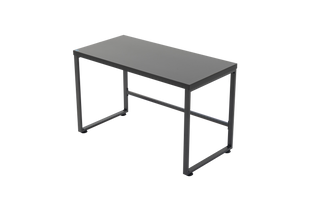
ONEX Nexus Gaming Desk 1200
$169.00 AUD
O
Skip to content


Published delivery estimates: metro 3–7, regional 5–10 and remote/rural 7–14 business days. Order processing is generally 1–3 business days.
These are general policy estimates, not a postcode quote or a guaranteed arrival date. Check pre-order dispatch timing separately.
Shipping charges and available services are calculated for your address at checkout. Australia only; PO Boxes and Parcel Lockers are excluded by the current policy. Remote locations and bulky freight may need confirmation.
Read shipping details · Ask about your postcode and productCare instructions and warranty support ↓
MAKE IT YOURS
Explore a matching category or add an available accessory.
$169.00 AUD

CARE & SUPPORT
Follow the instructions supplied with your exact model. Gently remove dust and loose debris. Avoid soaking upholstery, abrasive products and solvents. Confirm the material and approved cleaning method with ONEX if the instructions are missing or unclear.
Check the seat and back materials separately. A product photo or range name does not identify every surface. Do not apply a fabric or leather treatment unless the product instructions allow it.
Assemble and adjust the chair according to its instructions. Periodically check the specified fasteners and remove debris from castors. Use only compatible parts and follow the product's stated load limit.
Stop using a chair that has a damaged base, loose structural part or malfunctioning adjustment. Contact ONEX before attempting a repair. Do not open, modify, heat or puncture a gas lift.
Clean the desktop as directed for its finish and avoid leaving moisture on surfaces or joints. Keep cables clear and check their slack throughout the desk's intended height range. Observe the model's load and accessory limits.
Keep hands and objects clear of moving components. Follow the manufacturer's instructions for electrical safety, resets and troubleshooting. Stop using damaged electrical equipment and contact support; do not open the motor or control unit.
Published warranty period: Not listed — ask ONEX. Check the terms supplied with your model for the covered parts and claim requirements. A stated warranty period does not replace rights under the Australian Consumer Law.
Warranty registration and support. If the covered components or terms are not listed, ask ONEX to confirm them before ordering.
Contact ONEX with your order number or proof of purchase, model, selected colour and a description of the issue. Add clear photos of the affected part where relevant. Keep parts and accessories together and ask for the appropriate next step before sending a bulky item.
Contact ONEX support or read the returns and refund policy. For a product bought from another retailer, contact that seller about the purchase.
Check the published dimensions, adjustment range, materials and load rating for the exact product. Measure your room, desk clearance and delivery route. Ask ONEX to confirm any missing measurement before ordering.
A CLOSER LOOK


Add Tempur comfort to your gaming setup with the Tempur Blaze Mesh Gaming Chair. It pairs an authentic Tempur seat cushion with a breathable mesh back and a fabric outline design, giving a comfortable seat for gaming and general computer use.
Shop directly with ONEX on this page.